Trainer Calendar Sync & Optional Custom Fields

This update lets trainers sync their class schedule straight into their calendar app, and gives you far more control over the extra information you collect from students - including certificates that wait for required details and editable pricing on corporate invoices.
What's new
Sync your class schedule to your calendar app
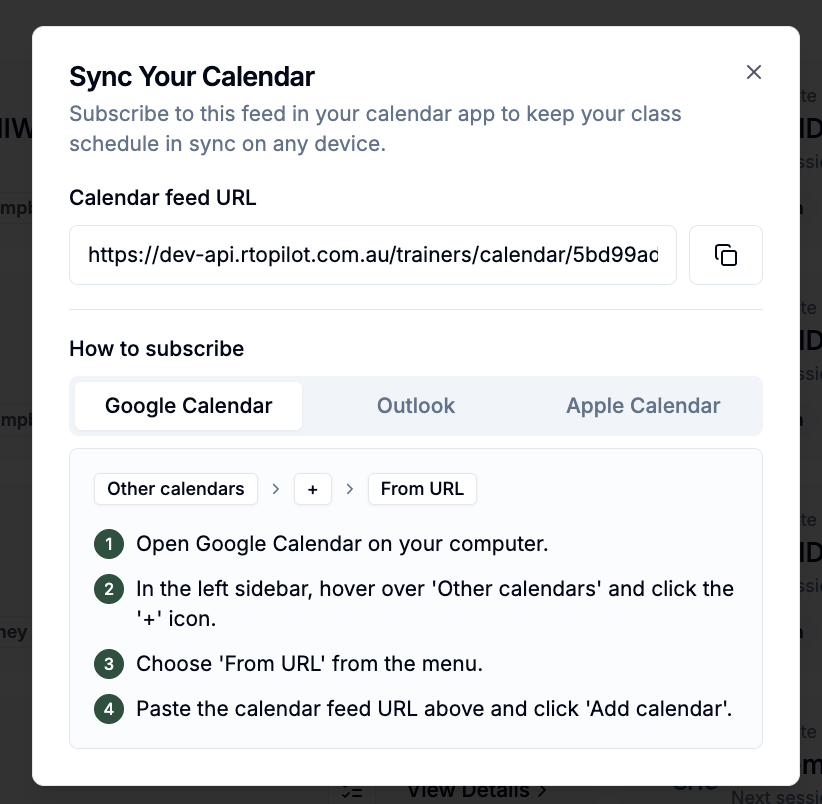
Trainers can now subscribe to their own class schedule from the Classes page in the trainer portal. The new Sync Calendar option provides a feed link with step-by-step setup instructions for Google, Outlook and Apple Calendar, and the subscription keeps their calendar up to date as classes are added or rescheduled.
More flexible custom fields
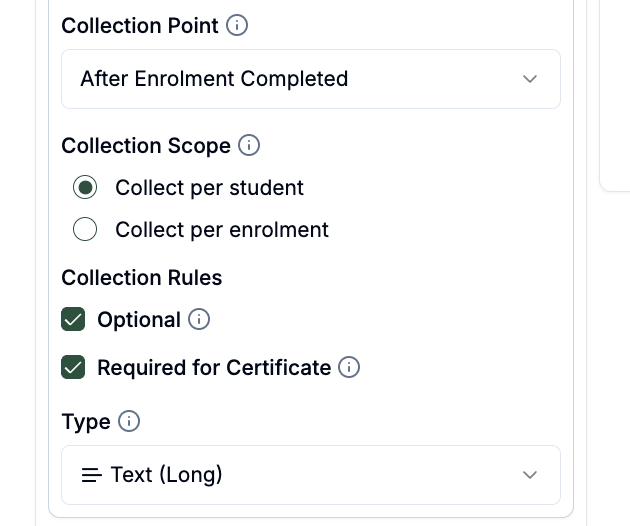
Custom fields in your data collection settings can now be marked as optional, so students can skip them and provide the information whenever it suits them. Administrators can also view and edit a student's custom field responses on their behalf, from the student's record and from enrolment pages.
Certificates that wait for required details
A custom field can now be marked as required for certificate issue. If a student finishes their training with that information still missing, their certificate is deferred rather than issued incomplete — the student sees exactly which details are outstanding in their portal, administrators can see why the certificate is waiting and can supply the missing details on the student's behalf, and the certificate is released automatically once the information is provided.
Update enrolment pricing on corporate invoices
Administrators can now edit line-item prices directly on a draft corporate invoice. The agreed price is what gets charged and is reflected in the enrolment's payment details, and voiding an invoice restores standard pricing.
Improvements
Session alerts on the calendar's day view — such as a class being over capacity — now show their message inside the class block, so you can see what needs attention without hovering over each class.
The session venue now appears on class blocks in both the week and day calendar views.
Corporate bookings now appear directly on class blocks in the calendar's week view.
Custom fields that a certificate template prints are now protected: they can no longer be deleted or disabled while a certificate design depends on them, so issued certificates never lose the details they display.
When a delivery partner issues certificates from a sponsoring organisation's template, the sponsor's certificate fields are now collected automatically during the partner's enrolments.
Searching certificate templates now matches a template's label as well as its name.
Trainers now see the same clearly formatted booking label that administrators see in class enrolment lists.
Units on certificates, and on the public certificate verification page, are now listed alphabetically by unit code.
Class notes can now be up to 3,000 characters long.
Questions in the quiz builder are now numbered, matching what students see, and renumber automatically when you reorder them.
The public certificate verification page has been tidied up, and long unit names now display in full instead of being cut off.
Course-level requirements are now labelled LLND — Language, Literacy, Numeracy and Digital Literacy — to reflect the digital literacy level they already include.
Bug fixes
Students on courses with delayed-release modules now see their online learning progress measured against released content only, so finishing everything currently available shows as complete rather than stalling below 100% — and online learning prompts no longer appear before any content has been released.
Transferring a student between two classes of the same course now correctly carries their online learning across.
Session check-ins are no longer recorded against a cancelled enrolment when the student also holds an active one, and attendance controls are hidden for cancelled enrolments.
The attendance switch now stays in step with the saved attendance record after a check-in.
Students who skipped an optional detail during enrolment are no longer re-prompted for it immediately after payment — the notification banner still lets them provide it whenever they're ready.
In filter dropdowns, selecting an option no longer also highlights a different option that happens to share the same name.