Changelog

Follow new updates and improvements to RTOPilot.

Location Time Zones & Corporate Booking Overhaul

Admins working across time zones see class times in the venue's zone and the corporate bookings module UX has been improved.

What's new

Location-scoped time zones

Every location stores an IANA time zone (inferred from the address, or chosen when inference fails). Class and session times in the admin portal display in that location's zone, with an indicator when it differs from the viewer's browser β€” so an operator in one zone creating a 9am Sydney class can see what students will actually see.
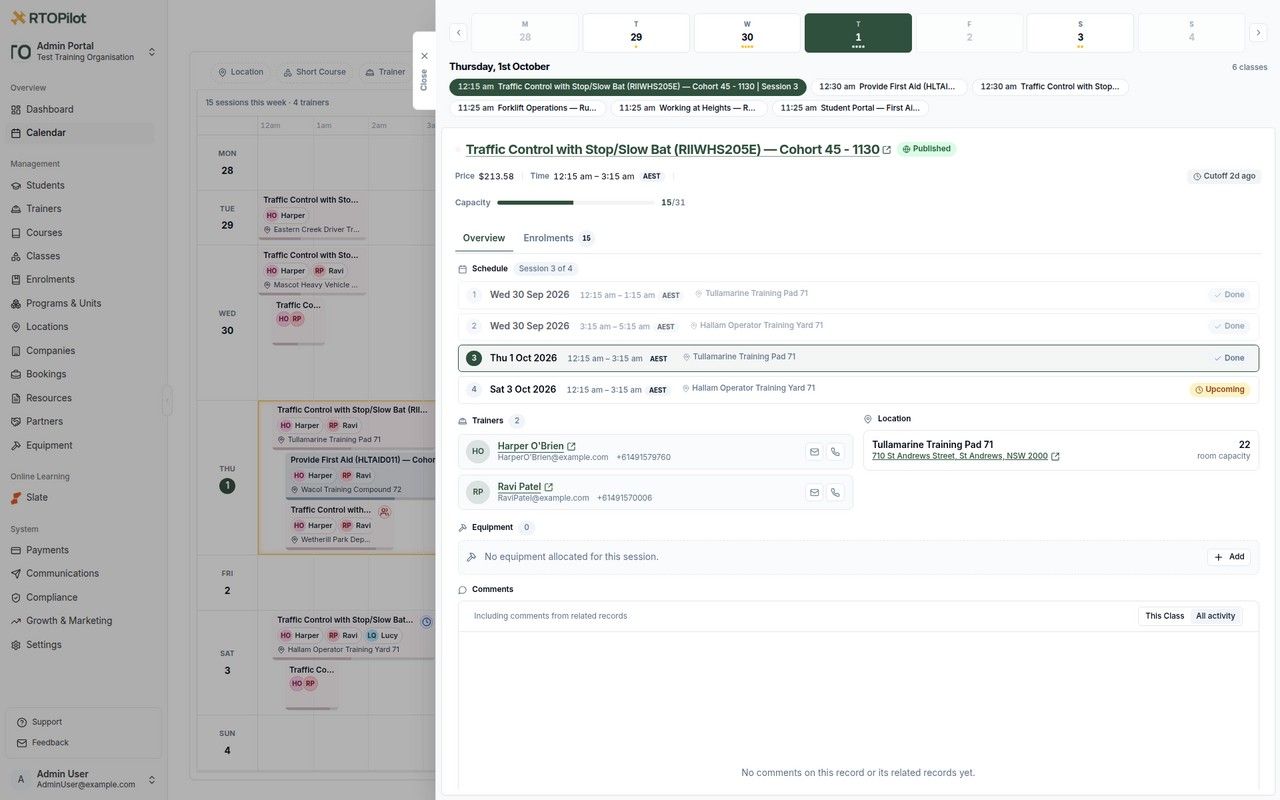
Location-scoped time zones

Corporate booking page overhaul and comments

The corporate booking details page is rebuilt around a clearer facts/settings layout, enrolment stats, course and class rows with pricing badges, and class creation in a drawer without leaving the booking. Comments can now be added on bookings and invoices (with invoice comments rolling up onto the booking thread).
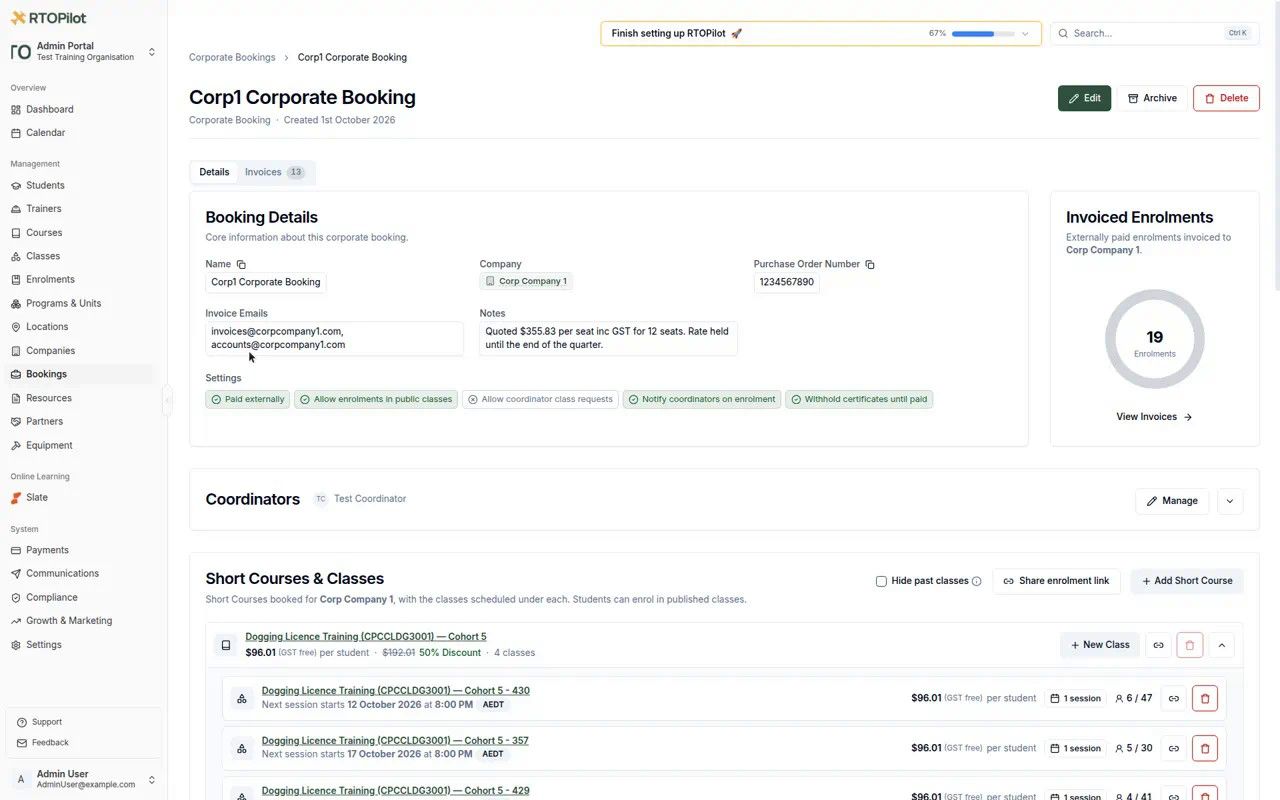
Corporate booking page overhaul and comments

Stepped add-course flow and per-class pricing

Adding a course to a corporate booking is a stepped flow, and classes can be priced per class as well as with the existing models.
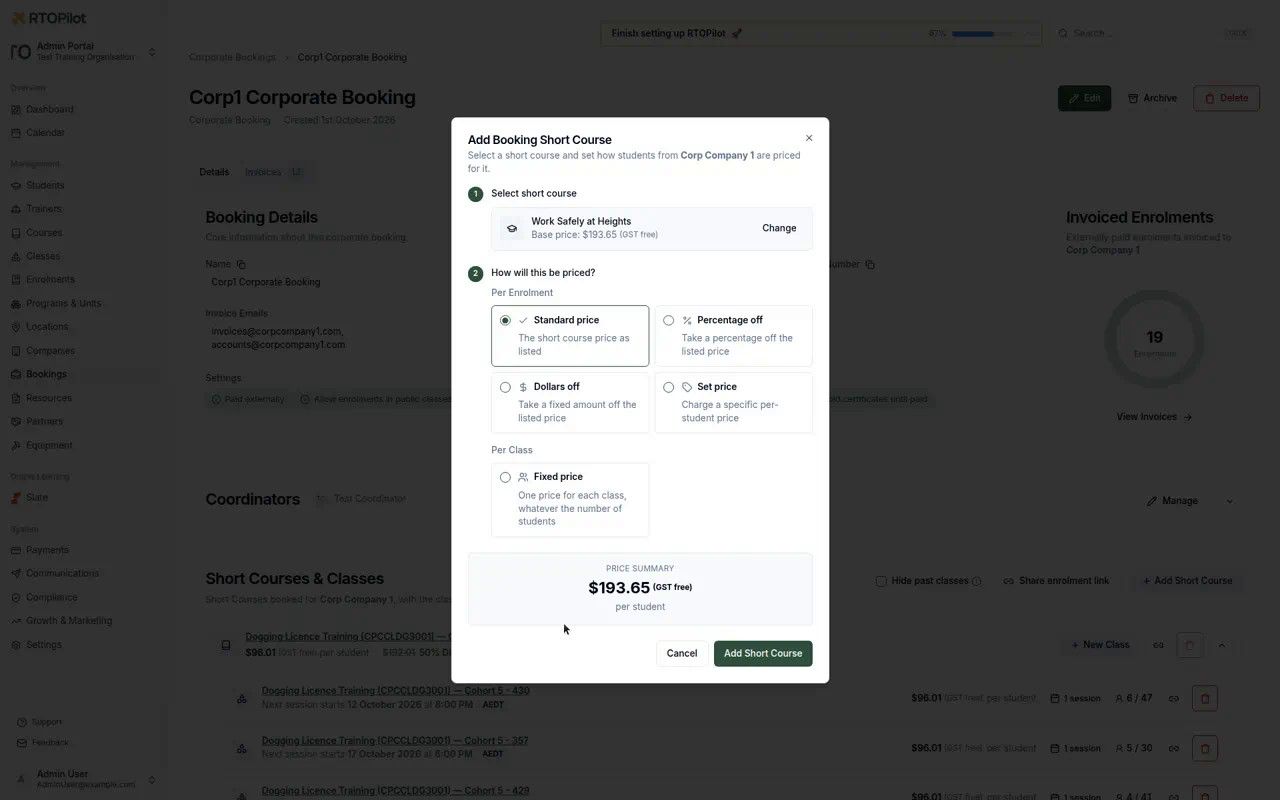
Stepped add-course flow and per-class pricing

Pay now link on invoice PDFs

Invoice PDFs include an online payment link when the organisation can take payments, matching the Pay now button already on invoice emails. The link is hidden when the organisation cannot take card payments.

Improvements

  • Custom data collection fields support rich-text help text, so enrolment forms can carry formatted instructions (bold, lists, links) instead of a wall of plain text.

  • The booking enrol-page share picker shows each class's real remaining seats.

  • Share All Courses can be filtered by location.

  • Location contacts can be edited in admin and coordinator portals (org and company locations).

  • The select-student picker shows date of birth when names collide.

  • Passwords that are too guessable β€” product or company names and common words β€” are rejected at set/change time.

  • Fee credits can now go up to $25,000 (was lower).

  • Students, staff and coordinators are shown by legal name in operational lists; known-as stays on trainer and account surfaces.

  • Automatic follow-ups also cover leads who never opened their enrolment email.

Bug fixes

  • Leaving the admin calendar or changing month cancels in-flight requests, cutting down "Request Timeout" toasts from stale loads.

  • Attendance PDF trainer/assessor signature sits at the foot of the page instead of immediately under the last attendee.

  • Certificate builder: horizontal and vertical lines render on the PDF again; renaming a page updates the heading; inline text edits stick when you click the page to finish; link elements keep their URL when switched to a fixed value; dismissing a shell banner no longer leaves the editor at a stale height.

  • NAT import accepts fee-for-service activity that carries a state funding code.
NewImprovedFixed

Enrolment Cart Checkout - 'Add to Cart'

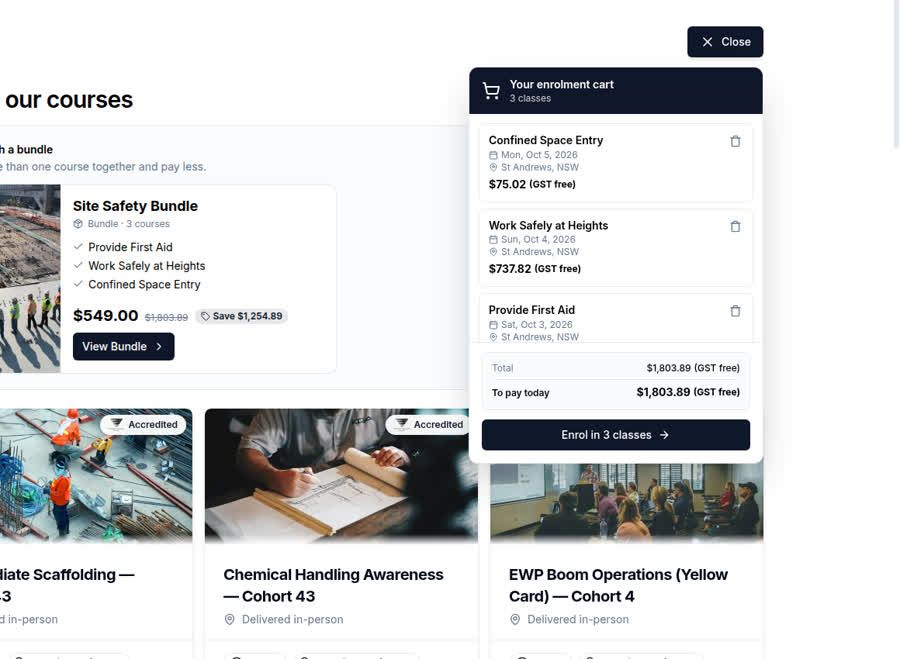
We’ve added a new way to pay for training with an eCommerce-like checkout experience so that students can enrol into classes from multiple courses in a single checkout.

What's new

Enrolment cart for public enrolments
Prospective students enrolling through your public enrolment pages can now add classes from multiple courses to a cart and pay for everything in a single checkout, completing one combined enrolment journey instead of enrolling course by course. The cart can be switched on per organisation; coupons aren't yet supported in the cart flow.

Enrolment cart

Improvements

  • Enrolments with money still owing before their class runs are now flagged on the dashboard, and calendar class events show an alert pip with the count of affected enrolments.

  • Group bookings now show a lifecycle timeline on their details page β€” booking created, confirmation sent, payment received and attendee enrolment emails sent β€” matching the timelines on enrolment leads and invoices.

  • Coordinators booking through the public group-booking form no longer have to supply a mobile number β€” the field is now optional for the coordinator, while attendees still need one.

  • The payouts table now shows each payout's bank Trace ID, which your bank may ask for if you contact them about a payout.

Bug fixes

  • Administrators can again cancel an in-progress student transfer when the original enrolment was already paid β€” these were previously stuck mid-transfer with the cancel option refused.

  • Typing a country's name in the phone-number country picker now finds it (previously only the two-letter code matched), and opening the picker no longer scrolls the embedded enrolment page to the top.

  • The enrolment confirmation email no longer claims the confirmation link expires in 3 days β€” the link doesn't expire.

NewImprovedFixed

Student Email History & Automatic Follow-Ups

Student records and communications get smarter: known-as names used across the app, a full email history on every student's profile, and automatic follow-ups for enrolments that stall before payment.

What's new

Known-as names on profiles
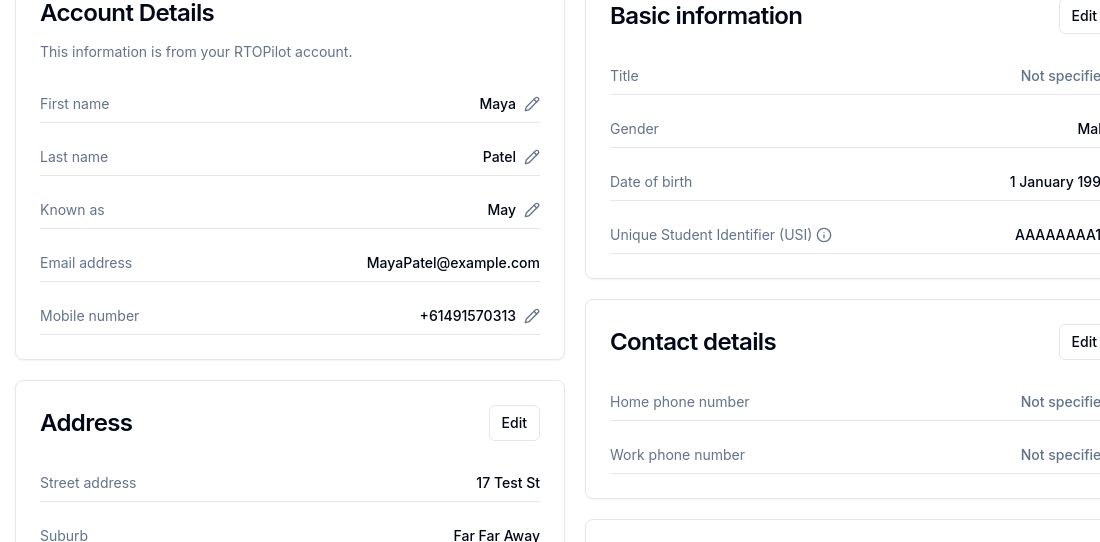
Students and trainers can now add a "known as" name to their profile, and it is used wherever their name appears across the app β€” class lists, calendars and portals β€” while legal names are preserved on certificates, invoices, and USI and AVETMISS reporting. Where the two differ, student and enrolment detail pages show the legal first name in brackets after the known-as name.
Student Known as on My Profile

Student email history
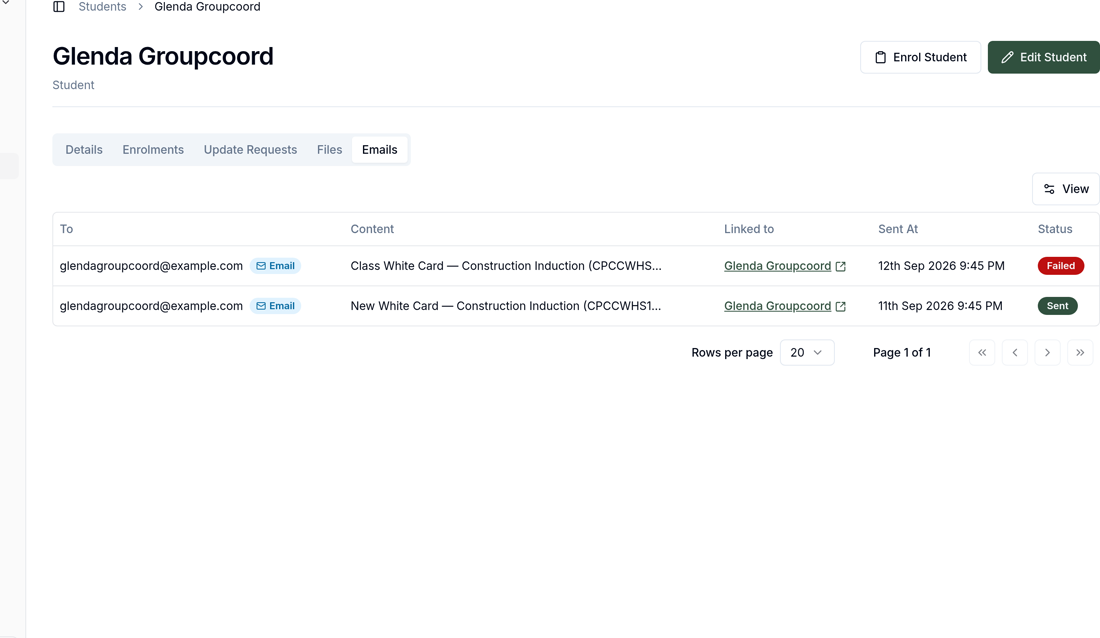
Administrators get a new Emails tab on each student's profile showing every email the organisation has sent them, and the organisation-wide email log now shows who each email was sent to. History is recorded against the person, so it survives email address changes and student merges.
Student email history

Automatic follow-ups for incomplete enrolments
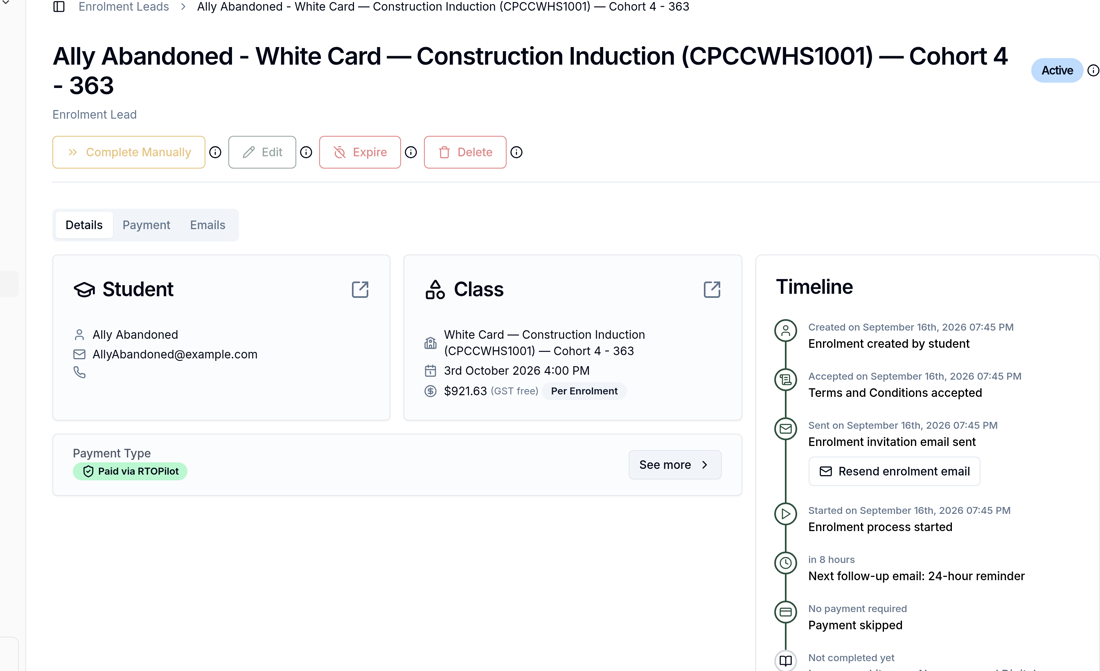
Students who start a self-enrolment, confirm their email, then drop off before paying now receive three automatic reminder emails β€” one hour after starting, 24 hours later, and on the morning their enrolment is due to expire. Administrators can see what's coming on the lead's timeline, including a countdown to the next reminder and a new Emails tab showing every message sent, and students can opt out through their email preferences.
Automatic follow-ups

Improvements

  • Invoices can now be emailed to up to five addresses on a company, corporate booking or individual invoice β€” previously each held a single address β€” and invoices, overdue reminders and credit notes go to the whole list in one email.
  • Coordinators can now search the Enrolments list in the corporate booking portal by student name, email or class, matching both a student's known-as and legal names.
  • Attendance sheets for corporate-booking classes now name the booking, its company and coordinators in the header, and attendees from a group booking show the booking owner beside the booking number.

Bug fixes

  • Email previews in the email log no longer show "not found" for emails that were genuinely delivered.
  • Trainer class reminders are now sent once per run of consecutive session days instead of once for every session day β€” a five-day course now sends two reminder emails rather than ten β€” and each email lists only the sessions that trainer is rostered on.
  • Certificate renewal reminders now show the renewal date in the timezone where the training was delivered, and reminders for imported historical training show the renewal date rather than an already-past end date.
NewImprovedFixed

Earlier updates