Certificate Numbers Per RTO & Cross-RTO Verification

Certificate numbers are now unique per issuing RTO, and public verification can find a certificate across organisations by number and student name.
What's new
Certificate numbers per issuing RTO
Each organisation draws certificate numbers from its own sequence instead of one global pool, so numbers stay unique and in sequence within the issuing RTO. Signed-in certificate links and QR codes identify certificates by id, which stays stable even when numbers are reused across RTOs.

Download approved pre-requisite evidence
Students can download the file that proved an approved pre-requisite from the Student Portal. When several evidence rows exist, RTOPilot picks the proving one for them. If the approved evidence has no file, they see that no file was attached.
Equipment pills on the calendar
Equipment on the calendar shows as a round pill beside the trainers in week view, and on its own row in day view. When a week block is too narrow, the pill shrinks to a hammer icon before trainer names drop to initials. Trainer chips use a short known-as name (first name and last initial). Allocating equipment whose units are already in use is refused at save time, in the session form and in Assign equipment mode.
Rich text in Classes bulk update
The class and course Bulk Update modals use the same rich text editor as the single-entity forms for Description and Notes, so you can format those fields when editing in bulk.
Student mobiles on attendance sheets
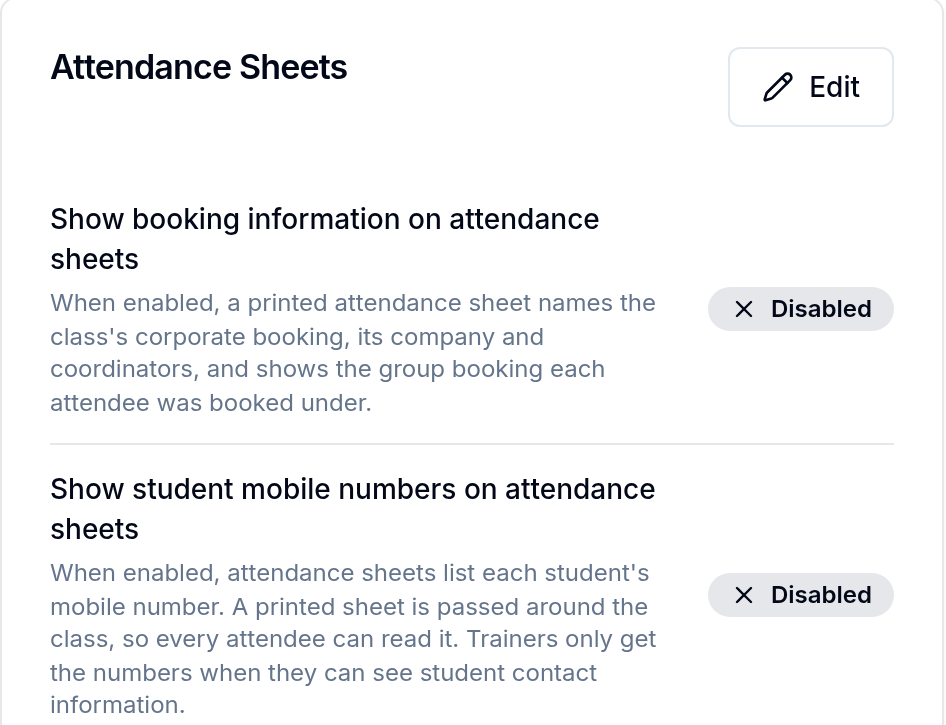
A new organisation setting under Settings › Organisation › Attendance Sheets can put each student's mobile on attendance sheet PDFs, XLSX and CSV downloads. It is off by default. Trainer downloads still need Show student contact info to trainers turned on as well.
Trainer conflict warnings when assigning sessions
Assigning trainers to sessions now warns when a trainer is double-booked or does not have enough travel time between locations. The warning appears across session forms and the calendar's Assign Trainers mode, without blocking the save.
Improvements
Data import numbers certificates per issuing organisation, matching the new per-RTO sequences.
Changing the phone number used for SMS sign-in codes now asks you to confirm it's you first.
Corporate booking enrolment tables list students by name.
Skipping enrolment steps for a student who has an email now needs permission to update enrolments.
Bug fixes
New programs save again. The program form has a Code field and tells you when a code is already in use.
The long course marking window shows the class that delivers each unit.
Public intake badges count down the same way as the admin cohort page.
Paid long course applications show Paid in full instead of an amount owing.